A rchive Date
[ 22-02-2006 ]
Category
[ Information Technologies ]
sub-Categoy
[ Microsoft ]
|
[http://www.microsoft.com/technet/community/columns/insider/default.mspx
Troubleshooting IIS 6 and Kerberos Issues
Q | I need help troubleshooting some IIS 6 and Kerberos issues. Are there any how-to guides or checklists available that will assist me in verifying our configuration? |
A | Authentication issues often pose problems to users of IIS. Unfortunately, authentication doesn’t offer a clear and decisive resolution, and there could be a number of root causes. The problem you are experiencing using Windows Integrated Authentication is a common issue, and there are several resources to assist you.
With limited knowledge of your situation, I would like to provide you with a few other items to check:
| • | Do all the servers belong to the same domain/forest? If not, you’ll need to make sure that the appropriate trusts are configured between domains. |
| • | Is the IIS Server configured as "trusted for delegation"? This can be done via the Active Directory Users and Computers MMC, as follows:
Domain\Computers\Computer name\Properties\
For Windows 2000-mixed domains:
On the General Tab, select "Trust computer for delegation."
For Windows Server 2003-native domains:
On the Delegation Tab, select at least "Trust this computer for delegation to any service."
| Important: After you change this setting in Active Directory, you will need to purge the client-side tickets using kerbtray.exe or by LogOff/LogOn on the client Kerbtray.exe. |
|
| • | Verify that the account that needs to be delegated is not marked as "Account is sensitive and cannot be delegated" in Active Directory. This can be done via the Active Directory Users and Computers MMC.
\UserAccount\Properties\Account Tab\Account options
|
| • | If the backend server is an MCS cluster, verify the settings described in the Knowledge Base article 235529: Kerberos support on Windows 2000-based server clusters. |
| • | On the client computer, verify that Internet Explorer uses Kerberos if offered by IIS6.
1. | In Internet Explorer, click the Tools menu, and then click Internet Options. |
2. | Select the Advanced tab, and ensure that the Enable Integrated Windows Authentication option is selected. |
|
| • | If IIS is being load-balanced via NLB, follow the instructions at: http://www.microsoft.com/technet/prodtechnol/windowsserver2003/technologies/security/kerbnlb.mspx. |
Now you need to check your IIS 6 configuration:
| • | The client requesting a Web site or virtual directory needs to be impersonated. If the application needs to delegate the authenticated user, verify that the Web site/virtual directory is not configured to use Anonymous Access via the IIS MMC:
\Website\Virtual Directory\Properties\Directory Security\Authentication Methods
"Enable Anonymous Access" is not selected
"Integrated Windows Authentication" is selected
After verifying that Integrated Windows Authentication is enabled, ensure that Kerberos is possible by reviewing the setting for the following metabase property:
NTAuthenticationProviders
This property must be set to either “Negotiate, NTLM” or “Negotiate” for Kerberos to be available. To verify this, use the following command at the command prompt:
Cscript adsutil.vbs get w3svc/NTAuthenticationProviders
It should return:
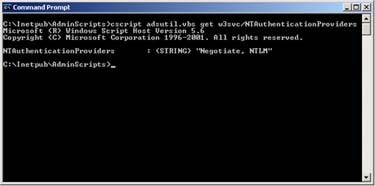
See full-sized image
| Important: This property can be set at various levels throughout the metabase configuration. To ensure that you are viewing the correct setting, ensure that you locate this property for the Web site, virtual directory, directory, or file for which you want Kerberos to work. You can easily determine if this property is set anywhere within the metabase using the following command: |
Cscript adsutil.vbs find NTAuthenticationProviders |
| • | If the application running on IIS is an ASP.Net application, make sure the ASP.Net Application impersonates the client. To verify this, open the Web.config file located in the Web Application folder and make sure that:
Under the <System.web> section, the following element for impersonation has been set:
<identity impersonate="true" />
|
| • | Verify if you need to set an additional Service Principal Name (SPN) for IIS, which depends on the IIS configuration. With an SPN the service is registered in Active Directory, this is a requirement for Kerberos to work. Use the SetSPN.exe utility to perform SPN changes. |
Backend Services Configuration:
We often refer to the remote system as the “backend service” and this indicates the location in which IIS will delegate the “impersonated” user’s token. It is required that there is a valid SPN registered in Active Directory, otherwise Kerberos traffic will fail between IIS and the backend service.
The backend could be a File Server, SQL Server, or another Web Server (IIS). We will not handle all configurable backend services and the required SPNs in this article.
Since SQL Server is the most common backend for this type of scenario, here are some additional resources (Knowledge Base articles) on setting up SQL Server:
|
© 2006 Microsoft Corporation. All rights reserved]
|