A rchive Date
[ 20-09-2002 ]
Category
[ Information Technologies ]
sub-Categoy
[ Microsoft ]
|
[http://www.microsoft.com/hwdev/tech/display/uga/default.asp
Universal Graphics Adapter: Firmware Solution for Low-Level Graphics Support
Contents:
This article describes the Microsoft vision for a replacement for VGA, the current standard for the minimum graphics support required by all PCs. Some of the original requirements of VGA are becoming harder to support as the PC continues to evolve. The VGA standard from the 1980s makes demands on hardware and software that are outdated today, such as the use of Int 10 services, a non-linear frame buffer, a very limited range of display modes, and direct register addressing using real-mode assembly language.
Universal Graphics Adapter (UGA) is a hardware-independent design that encapsulates and abstracts any low-level graphics hardware in a standard way by the use of firmware. It will not require the use of real-mode assembly language, direct hardware register or frame buffer access to program. It will provide support for basic drawing operations, continuous display modes and, eventually, power management. As a firmware-based standard, it will allow future evolution to support new hardware features as they become available.
Introduction
VGA was introduced in the 1980s, rapidly becoming the de facto minimum standard for all graphics devices, continuing to this day. Almost all display devices support VGA in addition to the high-performance device capabilities they expose. Most PCs require a VGA device to be in the machine before the system can boot. All the BIOS Power-On Self Test (POST) messages require a VGA device for them to be displayed.
Given the significance and success of VGA, it may be hard to understand why anyone would propose anything else. In addition to being a universal standard, VGA is also now an old standard, with capabilities and limitations that have not changed significantly as the PC platform has evolved. Periodically, the question arises of what can be done to enhance VGA. After considerable discussion, Microsoft is proposing UGA as a solution. Industry feedback has confirmed that forcing new hardware standards is not appropriate, so UGA is a firmware-only standard, intended to wrap any existing or planned hardware, including VGA.
Some Strengths and Limitations of VGA
VGA has a long history, with almost universal support and some great strengths. However, it also has some well-documented limitations. This section summarizes both the strengths and limitations of VGA.
Strengths of VGA
- Basic support exists on all PCs and associated display devices
- Almost all PC BIOSes assume the presence of a VGA device when they perform POST
- Legacy code will continue to work as long as there is a VGA-enabled device in a PC
- VGA provides encapsulated BIOS interfaces to set modes and do drawing
Limitations of VGA
- BIOS code executes in a real-mode x86 environment
- The video BIOS image restricted to an absolute maximum of 64K
- Legacy I/O and memory usage:
- Non-relocateable memory
- Non-intuitive non-linear frame buffer layout
- Limited mode support: 80 x 25 x 70Hz characters and 640 x 480 x 16-color graphics
- No support for power management
- No firmware support of VGA-disable adapters in a multiple-monitor configuration under Microsoft® Windows® operating systems
Goals for UGA
UGA is intended to eliminate the shortcomings of VGA without making basic graphical operations more difficult to perform. The use of firmware to wrap the hardware implementation makes it possible for a variety of display adapters to comply with the UGA specification without having to change the hardware.
Initially, it is expected that devices will support both a UGA and VGA BIOS. The VGA register set will not be changed, so the hybrid display adapters will continue to work in all existing machines, as well as working with a UGA-enable operating system.
UGA can be also seen as a natural extension of Plug and Play and ACPI (behind the PCI bus) by providing standardized ways of enumerating and manipulating the child devices of display adapters.
Although work is still in progress on the runtime environment for the firmware, it is expected that the UGA-only firmware will not require more than 32K of ROM.
Key features of UGA are as follows:
- All hardware details to be wrapped by firmware
- All exposed device capabilities implemented in firmware
- Native mode support to be exposed by the firmware
- No access required to legacy I/O ports or memory
- Use of Base Address Registers (BARs) in PCI space only
- No requirement for a real-mode execution environment
- No 64K limit to the size of BIOS
- Able to add new functionality to the BIOS
- Cross-platform support – x86-based abd Intel Itanium-based today
- Improve overall graphics hardware and driver quality
- Provide a highly tested base of driver functionality that …
- can also be accessed from the high-performance drivers
- can simplify driver creation
- can enhance driver stability
Non-Goals of UGA
UGA is being tightly defined as a replacement for VGA, with the specific objective of advancing the minimum level of graphics support available for all devices. UGA is not intended to answer every display device question that has been proposed.
- UGA is not attempting to define how graphics hardware should be designed or implemented. UGA is a firmware standard that will allow any graphics hardware implementation to be presented to operating system and hardware in a common way.
- UGA is not going to provide higher resolution character modes than VGA. UGA is not going to support character-mode at all — it is graphical, including the drawing of characters. There will be no requirement for hard-coded character sets on the device.
- UGA is not intended to replace high-performance drivers in consumer PC systems. All graphics device vendors will continue to have high-performance drivers that optimize their specific hardware implementations, and that make the best use of their key differentiating features.
- UGA is not designed to accelerate 3D drawing operations. UGA is not trying to supplant high-performance drivers with their myriad of advanced drawing features. It is intended only to replace VGA in the scenarios where VGA runs today.
Benefits of Using UGA Over Using VGA
For UGA to gain credibility as a standard, the technical goals outlined earlier must translate into user, IHV, and OEM benefits. In some cases, there will also be additional costs. This section describes these three areas in turn.
User Benefits
UGA will benefit different classes of user in different ways.
- All users will benefit from an improved pre- and post-boot experience. When users first switches on their computers, they will be presented with a high-resolution graphical display on which the OEM can place compelling graphics. This may include tools for repairing or configuring the system that follow the same paradigm as the operating system itself.
- An experienced user who wants to take advantage of multi-monitor support will not be required to understand how to disable the VGA BIOS on one of the display adapters, because UGA will just work.
- Users of high-availability servers will be able to use a robust, high-resolution display driver without concern over the reliability issues that currently restrict usage of some high-performance display drivers.
- Users upgrading from older releases of Windows on mobile PCs that lack high-performance display drivers will still benefit from power-managed driver support, unlike the VGA driver today.
User Costs
- Initially, UGA-enabled display adapters may be more expensive. However, this situation is unlikely to persist as they become more widely available and market forces drive down costs.
IHV Benefits
- New BIOSes can be developed in a high-level language (C) rather than in assembler. They will subsequently also be easier to maintain, because high-level language programming skills are more widely available than are assembler skills.
- BIOS size is not restricted to 64K, so support for new features can be added as they become available and required.
- The display adapters will be platform independent, because there is no requirement for Int 10 support or x86 assembler.
- It will cease to be necessary to support the VGA register set in new display adapters. Any display hardware can be made to support UGA by suitable firmware. This will allow the IHV to save money with both licensing costs and die size.
- As today with VGA, it will not be necessary for the IHV to provide a UGA driver. This driver will be provided as part of the operating system.
- The intention is to provide UGA support for certain features the high-performance driver can use, such as power management. As the UGA BIOS will be accessible at run-time, this feature set can be enhanced over time, thus simplifying IHV driver writers’ work and reducing IHV costs.
IHV Costs
- Initially IHVs will have to provide both UGA and VGA pages in the BIOS, which will require larger ROMs than today. Subsequently with UGA-only devices, they may choose to use smaller ROMs or add additional functionality in the available space.
OEM Benefits
- OEMs will be able to take advantage of UGA to present the user with high-resolution graphics as soon as the computer is switched on. They will be able to make the POST screens more intelligible and to provide compelling banners and animations as soon as POST has completed.
- OEMs will be able to ship high-reliability servers with high-resolution graphics support, without needing to find a high-performance display device. This can reduce system costs and product support calls, while improving the user’s satisfaction with the product.
OEM Costs
- For a computer to POST using UGA, it will be necessary to upgrade the motherboard BIOS to use UGA instead of VGA. This only becomes an issue when the OEM decides to ship UGA-only devices. This is unlikely to happen before such devices become widely available.
- For a computer with an integrated display adapter (rather than an add-in card), it will be necessary to upgrade the video BIOS to support UGA. This may be a cost for OEMs who provide their own custom BIOS.
Operating System Support for UGA
The operating system will be responsible for providing a UGA driver. This will initially support and subsequently supplant today’s VGA driver. To do this, a UGA Hardware Abstraction Layer (HAL) is required that will wrap both native UGA driver support and the VGA driver. This will allow the system to support the transition between VGA and UGA devices without problems. If both supported types are available, the system will default to UGA.
Figure 1 shows how UGA will be used by the system at boot time, in Safe mode and if the kernel bugcheck API is called, requiring a blue screen to be presented to the user.
Figure 1. UGA Components in a Windows NT Based Environment:
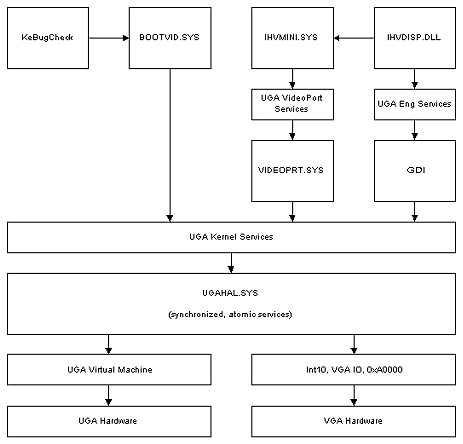
IHV High Performance Configuration
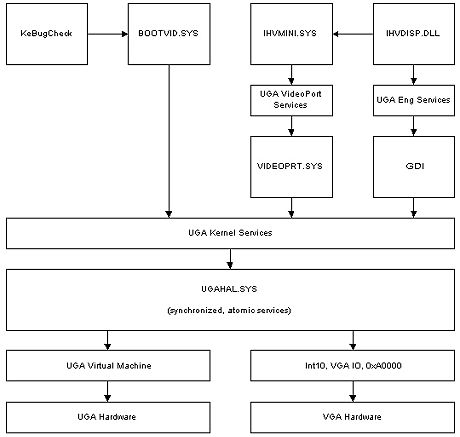
Figure 2 shows how the UGA services can be exploited by a high performance display driver, here shown by the two boxes IHVMINI.SYS and IHVMINI.DLL. As shown in the diagram above, the UGA kernel services and HAL allow either a native UGA driver or the existing VGA driver to provide the services that the high performance driver can exploit. These will initially comprise power management and will be added-to over time.
Figure 2. UGA Components in a Windows NT Based Environment
IHV High Performance Configuration
Summary
UGA is intended to move basic video support forward beyond what is exposed by VGA today. It is not intended to define hardware standards, as it will be implemented by wrapping existing and future hardware in a firmware layer. It is not intended to replace high performance display drivers in most situations; it merely exposes services that they can exploit if they chose. However, UGA will be capable of providing all necessary display support in a very specific set of circumstances.
Microsoft will work with the vendors of display adapters to evolve the firmware necessary to provide UGA support with existing hardware. It is not expected that the PC market will migrate from VGA to UGA overnight; indeed, it may take some years before UGA-only display adapters are available. However, it is expected that dual-mode display adapters providing both UGA and VGA support will appear considerably sooner.
Future releases of Microsoft Windows will include support for UGA in the operating system. As UGA-enabled systems become available, the move away from VGA can be completed. As part of this evolution, UGA is intended to help improve the overall quality and reliability of display drivers, not least by exporting certain features that they will be able to exploit.
References
| ACPI | Advanced Configuration and Power Interface |
| BAR | Base Address Register |
| BIOS | Basic Input Output Subsystem |
| HAL | Hardware Abstraction Layer |
| POST | Power-On Self Test |
| UGA | Universal Graphics Adapter |
Last Updated: June 12, 2002]
|